---
license: mit
datasets:
- SWE-Gym/SWE-Gym
language:
- en
base_model:
- Qwen/Qwen2.5-Coder-7B-Instruct
pipeline_tag: text-generation
tags:
- agent
- coding
---
# openhands-lm-7b-v0.1 GGUF Models
## **Choosing the Right Model Format**
Selecting the correct model format depends on your **hardware capabilities** and **memory constraints**.
### **BF16 (Brain Float 16) – Use if BF16 acceleration is available**
- A 16-bit floating-point format designed for **faster computation** while retaining good precision.
- Provides **similar dynamic range** as FP32 but with **lower memory usage**.
- Recommended if your hardware supports **BF16 acceleration** (check your device's specs).
- Ideal for **high-performance inference** with **reduced memory footprint** compared to FP32.
📌 **Use BF16 if:**
✔ Your hardware has native **BF16 support** (e.g., newer GPUs, TPUs).
✔ You want **higher precision** while saving memory.
✔ You plan to **requantize** the model into another format.
📌 **Avoid BF16 if:**
❌ Your hardware does **not** support BF16 (it may fall back to FP32 and run slower).
❌ You need compatibility with older devices that lack BF16 optimization.
---
### **F16 (Float 16) – More widely supported than BF16**
- A 16-bit floating-point **high precision** but with less of range of values than BF16.
- Works on most devices with **FP16 acceleration support** (including many GPUs and some CPUs).
- Slightly lower numerical precision than BF16 but generally sufficient for inference.
📌 **Use F16 if:**
✔ Your hardware supports **FP16** but **not BF16**.
✔ You need a **balance between speed, memory usage, and accuracy**.
✔ You are running on a **GPU** or another device optimized for FP16 computations.
📌 **Avoid F16 if:**
❌ Your device lacks **native FP16 support** (it may run slower than expected).
❌ You have memory limitations.
---
### **Quantized Models (Q4_K, Q6_K, Q8, etc.) – For CPU & Low-VRAM Inference**
Quantization reduces model size and memory usage while maintaining as much accuracy as possible.
- **Lower-bit models (Q4_K)** → **Best for minimal memory usage**, may have lower precision.
- **Higher-bit models (Q6_K, Q8_0)** → **Better accuracy**, requires more memory.
📌 **Use Quantized Models if:**
✔ You are running inference on a **CPU** and need an optimized model.
✔ Your device has **low VRAM** and cannot load full-precision models.
✔ You want to reduce **memory footprint** while keeping reasonable accuracy.
📌 **Avoid Quantized Models if:**
❌ You need **maximum accuracy** (full-precision models are better for this).
❌ Your hardware has enough VRAM for higher-precision formats (BF16/F16).
---
### **Very Low-Bit Quantization (IQ3_XS, IQ3_S, IQ3_M, Q4_K, Q4_0)**
These models are optimized for **extreme memory efficiency**, making them ideal for **low-power devices** or **large-scale deployments** where memory is a critical constraint.
- **IQ3_XS**: Ultra-low-bit quantization (3-bit) with **extreme memory efficiency**.
- **Use case**: Best for **ultra-low-memory devices** where even Q4_K is too large.
- **Trade-off**: Lower accuracy compared to higher-bit quantizations.
- **IQ3_S**: Small block size for **maximum memory efficiency**.
- **Use case**: Best for **low-memory devices** where **IQ3_XS** is too aggressive.
- **IQ3_M**: Medium block size for better accuracy than **IQ3_S**.
- **Use case**: Suitable for **low-memory devices** where **IQ3_S** is too limiting.
- **Q4_K**: 4-bit quantization with **block-wise optimization** for better accuracy.
- **Use case**: Best for **low-memory devices** where **Q6_K** is too large.
- **Q4_0**: Pure 4-bit quantization, optimized for **ARM devices**.
- **Use case**: Best for **ARM-based devices** or **low-memory environments**.
---
### **Summary Table: Model Format Selection**
| Model Format | Precision | Memory Usage | Device Requirements | Best Use Case |
|--------------|------------|---------------|----------------------|---------------|
| **BF16** | Highest | High | BF16-supported GPU/CPUs | High-speed inference with reduced memory |
| **F16** | High | High | FP16-supported devices | GPU inference when BF16 isn't available |
| **Q4_K** | Medium Low | Low | CPU or Low-VRAM devices | Best for memory-constrained environments |
| **Q6_K** | Medium | Moderate | CPU with more memory | Better accuracy while still being quantized |
| **Q8_0** | High | Moderate | CPU or GPU with enough VRAM | Best accuracy among quantized models |
| **IQ3_XS** | Very Low | Very Low | Ultra-low-memory devices | Extreme memory efficiency and low accuracy |
| **Q4_0** | Low | Low | ARM or low-memory devices | llama.cpp can optimize for ARM devices |
---
## **Included Files & Details**
### `openhands-lm-7b-v0.1-bf16.gguf`
- Model weights preserved in **BF16**.
- Use this if you want to **requantize** the model into a different format.
- Best if your device supports **BF16 acceleration**.
### `openhands-lm-7b-v0.1-f16.gguf`
- Model weights stored in **F16**.
- Use if your device supports **FP16**, especially if BF16 is not available.
### `openhands-lm-7b-v0.1-bf16-q8_0.gguf`
- **Output & embeddings** remain in **BF16**.
- All other layers quantized to **Q8_0**.
- Use if your device supports **BF16** and you want a quantized version.
### `openhands-lm-7b-v0.1-f16-q8_0.gguf`
- **Output & embeddings** remain in **F16**.
- All other layers quantized to **Q8_0**.
### `openhands-lm-7b-v0.1-q4_k.gguf`
- **Output & embeddings** quantized to **Q8_0**.
- All other layers quantized to **Q4_K**.
- Good for **CPU inference** with limited memory.
### `openhands-lm-7b-v0.1-q4_k_s.gguf`
- Smallest **Q4_K** variant, using less memory at the cost of accuracy.
- Best for **very low-memory setups**.
### `openhands-lm-7b-v0.1-q6_k.gguf`
- **Output & embeddings** quantized to **Q8_0**.
- All other layers quantized to **Q6_K** .
### `openhands-lm-7b-v0.1-q8_0.gguf`
- Fully **Q8** quantized model for better accuracy.
- Requires **more memory** but offers higher precision.
### `openhands-lm-7b-v0.1-iq3_xs.gguf`
- **IQ3_XS** quantization, optimized for **extreme memory efficiency**.
- Best for **ultra-low-memory devices**.
### `openhands-lm-7b-v0.1-iq3_m.gguf`
- **IQ3_M** quantization, offering a **medium block size** for better accuracy.
- Suitable for **low-memory devices**.
### `openhands-lm-7b-v0.1-q4_0.gguf`
- Pure **Q4_0** quantization, optimized for **ARM devices**.
- Best for **low-memory environments**.
- Prefer IQ4_NL for better accuracy.
# 🚀 If you find these models useful
❤ **Please click "Like" if you find this useful!**
Help me test my **AI-Powered Network Monitor Assistant** with **quantum-ready security checks**:
👉 [Quantum Network Monitor](https://readyforquantum.com/dashboard)
💬 **How to test**:
1. Click the **chat icon** (bottom right on any page)
2. Choose an **AI assistant type**:
- `TurboLLM` (GPT-4-mini)
- `FreeLLM` (Open-source)
- `TestLLM` (Experimental CPU-only)
### **What I’m Testing**
I’m pushing the limits of **small open-source models for AI network monitoring**, specifically:
- **Function calling** against live network services
- **How small can a model go** while still handling:
- Automated **Nmap scans**
- **Quantum-readiness checks**
- **Metasploit integration**
🟡 **TestLLM** – Current experimental model (llama.cpp on 6 CPU threads):
- ✅ **Zero-configuration setup**
- ⏳ 30s load time (slow inference but **no API costs**)
- 🔧 **Help wanted!** If you’re into **edge-device AI**, let’s collaborate!
### **Other Assistants**
🟢 **TurboLLM** – Uses **gpt-4-mini** for:
- **Real-time network diagnostics**
- **Automated penetration testing** (Nmap/Metasploit)
- 🔑 Get more tokens by [downloading our Quantum Network Monitor Agent](https://readyforquantum.com/download/?utm_source=huggingface&utm_medium=referral&utm_campaign=huggingface_repo_readme)
🔵 **HugLLM** – Open-source models (≈8B params):
- **2x more tokens** than TurboLLM
- **AI-powered log analysis**
- 🌐 Runs on Hugging Face Inference API
### 💡 **Example AI Commands to Test**:
1. `"Give me info on my websites SSL certificate"`
2. `"Check if my server is using quantum safe encyption for communication"`
3. `"Run a quick Nmap vulnerability test"`
4. '"Create a cmd processor to .. (what ever you want)" Note you need to install a Quantum Network Monitor Agent to run the .net code from. This is a very flexible and powerful feature. Use with caution!
### Final word
I fund the servers to create the models files, run the Quantum Network Monitor Service and Pay for Inference from Novita and OpenAI all from my own pocket. All of the code for creating the models and the work I have done with Quantum Network Monitor is [open source](https://github.com/Mungert69). Feel free to use what you find useful. Please support my work and consider [buying me a coffee](https://www.buymeacoffee.com/mahadeva) .
This will help me pay for the services and increase the token limits for everyone.
Thank you :)

OpenHands LM v0.1
Blog
•
Use it in OpenHands
**This is a smaller 7B model trained following the recipe of [all-hands/openhands-lm-32b-v0.1](https://huggingface.co/all-hands/openhands-lm-32b-v0.1).**
---
Autonomous agents for software development are already contributing to a [wide range of software development tasks](/blog/8-use-cases-for-generalist-software-development-agents).
But up to this point, strong coding agents have relied on proprietary models, which means that even if you use an open-source agent like [OpenHands](https://github.com/All-Hands-AI/OpenHands), you are still reliant on API calls to an external service.
Today, we are excited to introduce OpenHands LM, a new open coding model that:
- Is open and [available on Hugging Face](https://huggingface.co/all-hands/openhands-lm-32b-v0.1), so you can download it and run it locally
- Is a reasonable size, 32B, so it can be run locally on hardware such as a single 3090 GPU
- Achieves strong performance on software engineering tasks, including 37.2% resolve rate on SWE-Bench Verified
Read below for more details and our future plans!
## What is OpenHands LM?
OpenHands LM is built on the foundation of [Qwen Coder 2.5 Instruct 32B](https://huggingface.co/Qwen/Qwen2.5-Coder-32B-Instruct), leveraging its powerful base capabilities for coding tasks. What sets OpenHands LM apart is our specialized fine-tuning process:
- We used training data generated by OpenHands itself on a diverse set of open-source repositories
- Specifically, we use an RL-based framework outlined in [SWE-Gym](https://arxiv.org/abs/2412.21139), where we set up a training environment, generate training data using an existing agent, and then fine-tune the model on examples that were resolved successfully
- It features a 128K token context window, ideal for handling large codebases and long-horizon software engineering tasks
## Performance: Punching Above Its Weight
We evaluated OpenHands LM using our latest [iterative evaluation protocol](https://github.com/All-Hands-AI/OpenHands/tree/main/evaluation/benchmarks/swe_bench#run-inference-rollout-on-swe-bench-instances-generate-patch-from-problem-statement) on the [SWE-Bench Verified benchmark](https://www.swebench.com/#verified).
The results are impressive:
- **37.2% verified resolve rate** on SWE-Bench Verified
- Performance comparable to models with **20x more parameters**, including Deepseek V3 0324 (38.8%) with 671B parameters
Here's how OpenHands LM compares to other leading open-source models:
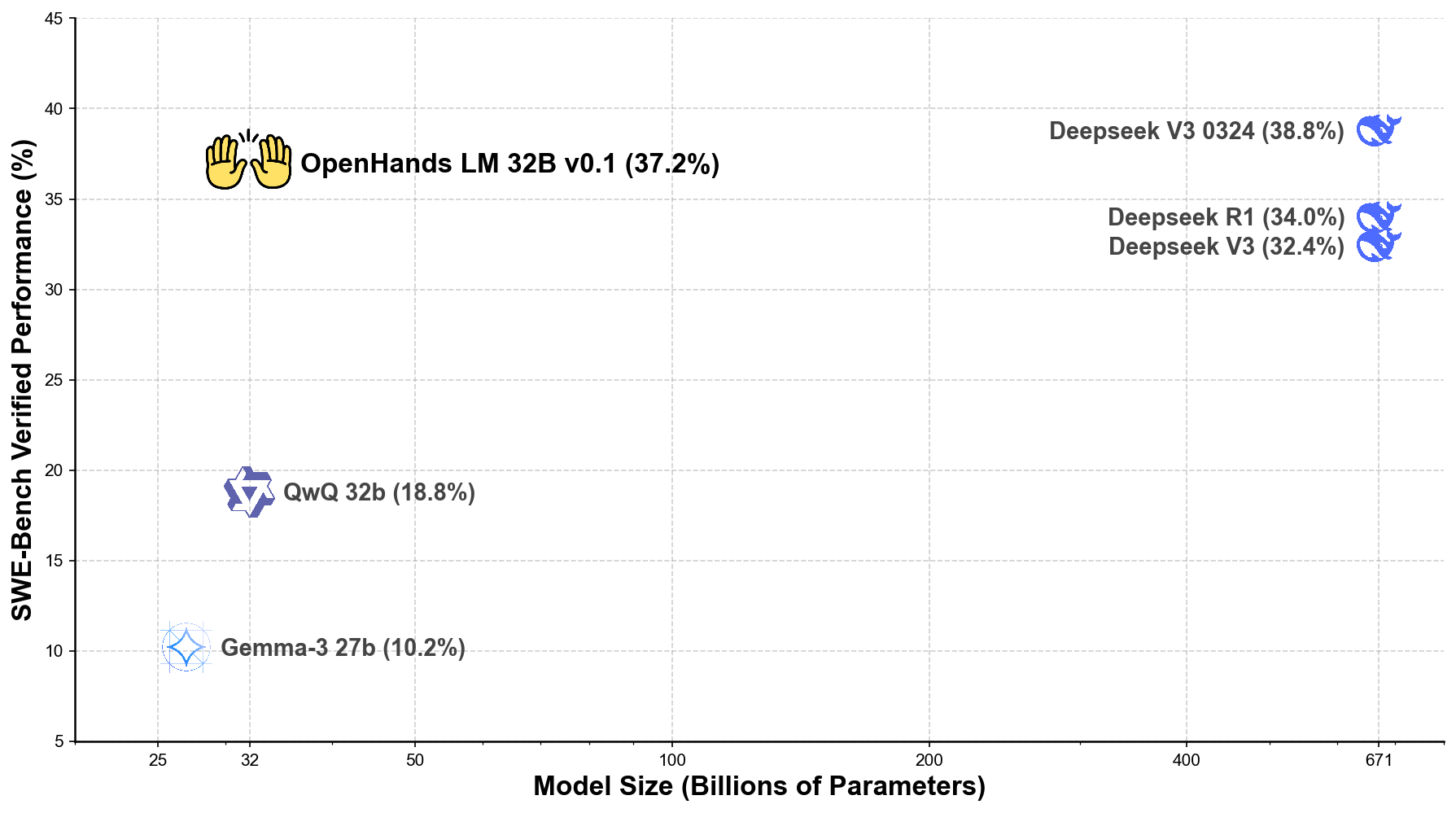
As the plot demonstrates, our 32B parameter model achieves efficiency that approaches much larger models. While the largest models (671B parameters) achieve slightly higher scores, our 32B parameter model performs remarkably well, opening up possibilities for local deployment that are not possible with larger models.
## Getting Started: How to Use OpenHands LM Today
You can start using OpenHands LM immediately through these channels:
1. **Download the model from Hugging Face**
The model is available on [Hugging Face](https://huggingface.co/all-hands/openhands-lm-32b-v0.1) and can be downloaded directly from there.
2. **Create an OpenAI-compatible endpoint with a model serving framework**
For optimal performance, it is recommended to serve this model with a GPU using [SGLang](https://github.com/sgl-project/sglang) or [vLLM](https://github.com/vllm-project/vllm).
3. **Point your OpenHands agent to the new model**
Download [OpenHands](https://github.com/All-Hands-AI/OpenHands) and follow the instructions for [using an OpenAI-compatible endpoint](https://docs.all-hands.dev/modules/usage/llms/openai-llms#using-openai-compatible-endpoints).
## The Road Ahead: Our Development Plans
This initial release marks just the beginning of our journey. We will continue enhancing OpenHands LM based on community feedback and ongoing research initiatives.
In particular, it should be noted that the model is still a research preview, and (1) may be best suited for tasks regarding solving github issues and perform less well on more varied software engineering tasks, (2) may sometimes generate repetitive steps, and (3) is somewhat sensitive to quantization, and may not function at full performance at lower quantization levels.
Our next releases will focus on addressing these limitations.
We're also developing more compact versions of the model (including a 7B parameter variant) to support users with limited computational resources. These smaller models will preserve OpenHands LM's core strengths while dramatically reducing hardware requirements.
We encourage you to experiment with OpenHands LM, share your experiences, and participate in its evolution. Together, we can create better tools for tomorrow's software development landscape.
## Try OpenHands Cloud
While OpenHands LM is a powerful model you can run locally, we also offer a fully managed cloud solution that makes it even easier to leverage AI for your software development needs.
[OpenHands Cloud](https://www.all-hands.dev/blog/introducing-the-openhands-cloud) provides:
- Seamless GitHub integration with issue and PR support
- Multiple interaction methods including text, voice, and mobile
- Parallel agent capabilities for working on multiple tasks simultaneously
- All the power of OpenHands without managing infrastructure
OpenHands Cloud is built on the same technology as our open-source solution but adds convenient features for teams and individuals who want a ready-to-use platform. [Visit app.all-hands.dev](https://app.all-hands.dev) to get started today!
## Join Our Community
We invite you to be part of the OpenHands LM journey:
- Explore our [GitHub repository](https://github.com/All-Hands-AI/OpenHands)
- Connect with us on [Slack](https://join.slack.com/t/openhands-ai/shared_invite/zt-2tom0er4l-JeNUGHt_AxpEfIBstbLPiw)
- Follow our [documentation](https://docs.all-hands.dev) to get started
By contributing your experiences and feedback, you'll help shape the future of this open-source initiative. Together, we can create better tools for tomorrow's software development landscape.
We can't wait to see what you'll create with OpenHands LM!