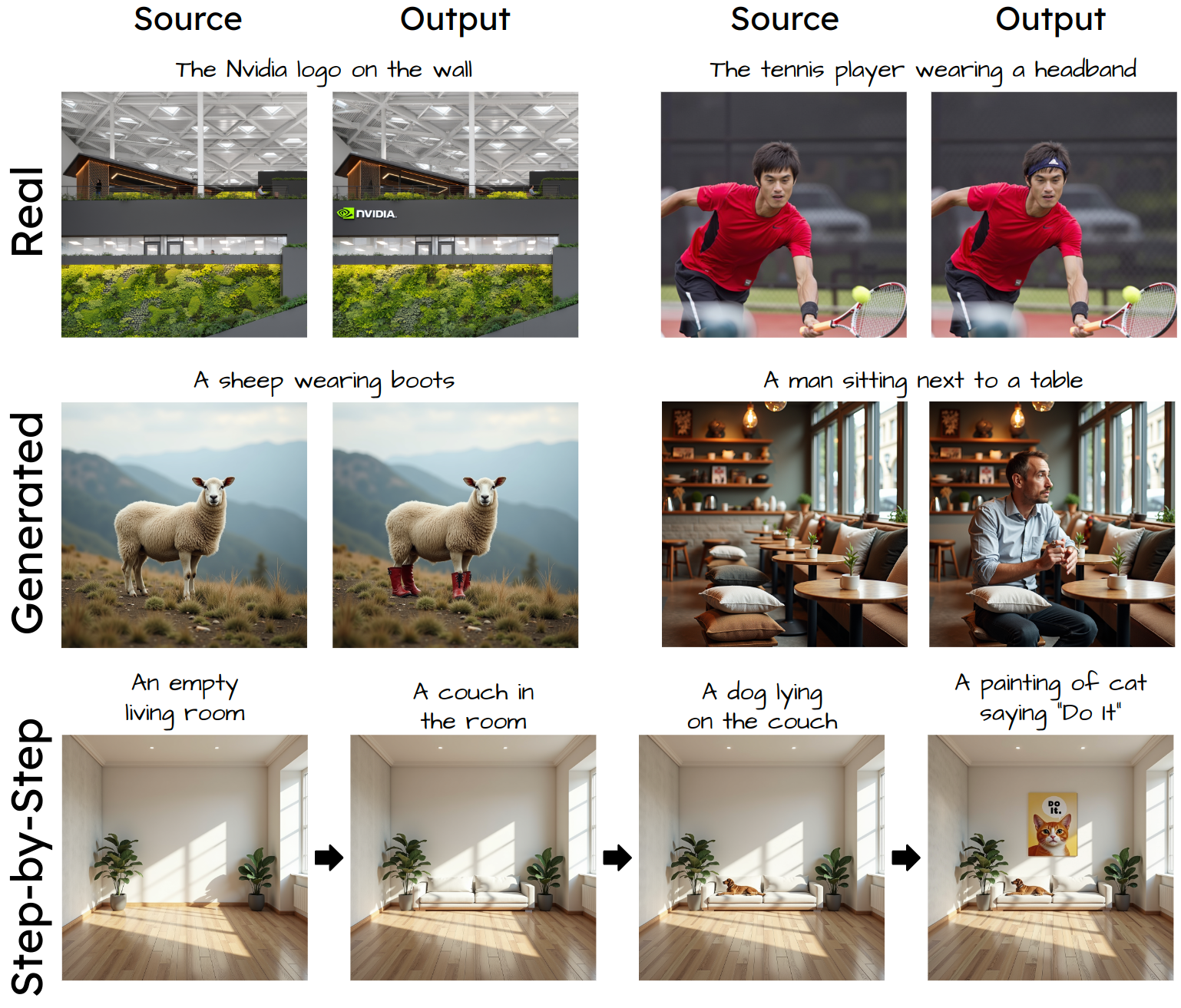
# 🎨 Add-it: Training-Free Object Insertion in Images With Pretrained Diffusion Models
[](https://arxiv.org/abs/2411.07232)
[](https://research.nvidia.com/labs/par/addit/)
## 👥 Authors
**Yoad Tewel**1,2, **Rinon Gal**1,2, **Dvir Samuel**3, **Yuval Atzmon**1, **Lior Wolf**2, **Gal Chechik**1
1NVIDIA • 2Tel Aviv University • 3Bar-Ilan University
## 📄 Abstract
Adding objects into images based on text instructions is a challenging task in semantic image editing, requiring a balance between preserving the original scene and seamlessly integrating the new object in a fitting location. Despite extensive efforts, existing models often struggle with this balance, particularly with finding a natural location for adding an object in complex scenes.
We introduce **Add-it**, a training-free approach that extends diffusion models' attention mechanisms to incorporate information from three key sources: the scene image, the text prompt, and the generated image itself. Our weighted extended-attention mechanism maintains structural consistency and fine details while ensuring natural object placement.
Without task-specific fine-tuning, Add-it achieves state-of-the-art results on both real and generated image insertion benchmarks, including our newly constructed "Additing Affordance Benchmark" for evaluating object placement plausibility, outperforming supervised methods. Human evaluations show that Add-it is preferred in over 80% of cases, and it also demonstrates improvements in various automated metrics.
---
## 📋 Description
This repository contains the official implementation of the Add-it paper, providing tools for seamless object insertion into images using pretrained diffusion models.
---
## 🛠️ Setup
```bash
conda env create -f environment.yml
conda activate addit
```
---
## 🚀 Usage
### 💻 Command Line Interface (CLI)
Add-it provides two CLI scripts for different use cases:
#### 1. 🎭 Adding Objects to Generated Images
Use `run_CLI_addit_generated.py` to add objects to AI-generated images:
```bash
python run_CLI_addit_generated.py \
--prompt_source "A photo of a cat sitting on the couch" \
--prompt_target "A photo of a cat wearing a red hat sitting on the couch" \
--subject_token "hat"
```
##### ⚙️ Options for Generated Images
**🔴 Required Arguments:**
- `--prompt_source`: Source prompt for generating the base image
- `--prompt_target`: Target prompt describing the desired edited image
- `--subject_token`: Single token representing the subject to add (must appear in prompt_target)
**🔵 Optional Arguments:**
- `--output_dir`: Directory to save output images (default: "outputs")
- `--seed_src`: Seed for source generation (default: 6311)
- `--seed_obj`: Seed for edited image generation (default: 1)
- `--extended_scale`: Extended attention scale (default: 1.05)
- `--structure_transfer_step`: Structure transfer step (default: 2)
- `--blend_steps`: Blend steps (default: [15]). To allow for changes in the input image pass `--blend_steps` with empty value.
- `--localization_model`: Localization model (default: "attention_points_sam")
- **Options:** `attention_points_sam`, `attention`, `attention_box_sam`, `attention_mask_sam`, `grounding_sam`
- `--show_attention`: Show attention maps using pyplot (flag), will be saved to `attn_vis.png`.
#### 2. 📸 Adding Objects to Real Images
Use `run_CLI_addit_real.py` to add objects to existing images:
```bash
python run_CLI_addit_real.py \
--source_image "images/bed_dark_room.jpg" \
--prompt_source "A photo of a bed in a dark room" \
--prompt_target "A photo of a dog lying on a bed in a dark room" \
--subject_token "dog"
```
##### ⚙️ Options for Real Images
**🔴 Required Arguments:**
- `--source_image`: Path to the source image (default: "images/bed_dark_room.jpg")
- `--prompt_source`: Source prompt describing the original image
- `--prompt_target`: Target prompt describing the desired edited image
- `--subject_token`: Subject token to add to the image (must appear in prompt_target)
**🔵 Optional Arguments:**
- `--output_dir`: Directory to save output images (default: "outputs")
- `--seed_src`: Seed for source generation (default: 6311)
- `--seed_obj`: Seed for edited image generation (default: 1)
- `--extended_scale`: Extended attention scale (default: 1.1)
- `--structure_transfer_step`: Structure transfer step (default: 4)
- `--blend_steps`: Blend steps (default: [18]). To allow for changes in the input image pass `--blend_steps` with empty value.
- `--localization_model`: Localization model (default: "attention")
- **Options:** `attention_points_sam`, `attention`, `attention_box_sam`, `attention_mask_sam`, `grounding_sam`
- `--use_offset`: Use offset in processing (flag)
- `--show_attention`: Show attention maps using pyplot (flag), will be saved to `attn_vis.png`.
- `--disable_inversion`: Disable source image inversion (flag)
---
### 📓 Jupyter Notebooks
You can run Add-it in two interactive modes:
| Mode | Notebook | Description |
|------|----------|-------------|
| 🎭 **Generated Images** | `run_addit_generated.ipynb` | Adding objects to AI-generated images |
| 📸 **Real Images** | `run_addit_real.ipynb` | Adding objects to existing real images |
The notebooks contain examples of different prompts and parameters that can be adjusted to control the object insertion process.
---
## 💡 Tips for Better Results
- **Prompt Design**: The `--prompt_target` should be similar to the `--prompt_source`, but include a description of the new object to insert
- **Seed Variation**: Try different values for `--seed_obj` - some prompts may require a few attempts to get satisfying results
- **Localization Models**: The most effective `--localization_model` options are `attention_points_sam` and `attention`. Use the `--show_attention` flag to visualize localization performance
- **Object Placement Issues**: If the object is not added to the image:
- Try **decreasing** `--structure_transfer_step`
- Try **increasing** `--extended_scale`
- **Flexibility**: To allow more flexibility in modifying the source image, set `--blend_steps` to an empty value to send an empty list: `[]`
---
## 📰 News
- **🎉 2025 JUL**: Official Add-it implementation is released!
---
## 📝 TODO
- [x] Release code
---
## 📚 Citation
If you make use of our work, please cite our paper:
```bibtex
@misc{tewel2024addit,
title={Add-it: Training-Free Object Insertion in Images With Pretrained Diffusion Models},
author={Yoad Tewel and Rinon Gal and Dvir Samuel and Yuval Atzmon and Lior Wolf and Gal Chechik},
year={2024},
eprint={2411.07232},
archivePrefix={arXiv},
primaryClass={cs.CV}
}
```
---
🌟 Star this repo if you find it useful! 🌟