Instructions to use smallstepai/Misal-7B-base-v0.1 with libraries, inference providers, notebooks, and local apps. Follow these links to get started.
- Libraries
- Transformers
How to use smallstepai/Misal-7B-base-v0.1 with Transformers:
# Use a pipeline as a high-level helper from transformers import pipeline pipe = pipeline("text-generation", model="smallstepai/Misal-7B-base-v0.1")# Load model directly from transformers import AutoTokenizer, AutoModelForCausalLM tokenizer = AutoTokenizer.from_pretrained("smallstepai/Misal-7B-base-v0.1") model = AutoModelForCausalLM.from_pretrained("smallstepai/Misal-7B-base-v0.1") - Notebooks
- Google Colab
- Kaggle
- Local Apps Settings
- vLLM
How to use smallstepai/Misal-7B-base-v0.1 with vLLM:
Install from pip and serve model
# Install vLLM from pip: pip install vllm # Start the vLLM server: vllm serve "smallstepai/Misal-7B-base-v0.1" # Call the server using curl (OpenAI-compatible API): curl -X POST "http://localhost:8000/v1/completions" \ -H "Content-Type: application/json" \ --data '{ "model": "smallstepai/Misal-7B-base-v0.1", "prompt": "Once upon a time,", "max_tokens": 512, "temperature": 0.5 }'Use Docker
docker model run hf.co/smallstepai/Misal-7B-base-v0.1
- SGLang
How to use smallstepai/Misal-7B-base-v0.1 with SGLang:
Install from pip and serve model
# Install SGLang from pip: pip install sglang # Start the SGLang server: python3 -m sglang.launch_server \ --model-path "smallstepai/Misal-7B-base-v0.1" \ --host 0.0.0.0 \ --port 30000 # Call the server using curl (OpenAI-compatible API): curl -X POST "http://localhost:30000/v1/completions" \ -H "Content-Type: application/json" \ --data '{ "model": "smallstepai/Misal-7B-base-v0.1", "prompt": "Once upon a time,", "max_tokens": 512, "temperature": 0.5 }'Use Docker images
docker run --gpus all \ --shm-size 32g \ -p 30000:30000 \ -v ~/.cache/huggingface:/root/.cache/huggingface \ --env "HF_TOKEN=<secret>" \ --ipc=host \ lmsysorg/sglang:latest \ python3 -m sglang.launch_server \ --model-path "smallstepai/Misal-7B-base-v0.1" \ --host 0.0.0.0 \ --port 30000 # Call the server using curl (OpenAI-compatible API): curl -X POST "http://localhost:30000/v1/completions" \ -H "Content-Type: application/json" \ --data '{ "model": "smallstepai/Misal-7B-base-v0.1", "prompt": "Once upon a time,", "max_tokens": 512, "temperature": 0.5 }' - Docker Model Runner
How to use smallstepai/Misal-7B-base-v0.1 with Docker Model Runner:
docker model run hf.co/smallstepai/Misal-7B-base-v0.1
Misal-7B-base-v0.1
It is a language model based on Meta's Llama2 architecture, pretrained using Marathi Text Data.
Built by - smallstep.ai
Making of Misal?
Detailed blog here.
Pretraining :
During the pretraining phase of our large language model, the model was exposed to a vast corpus of text data comprising approximately 2 billion Marathi tokens. This corpus primarily consisted of newspaper data spanning the years 2016 to 2022, sourced primarily from the CulturaX dataset. In addition to this, we supplemented our training data with additional sources such as l3cube, ai4bharat, and other internet-based datasets.
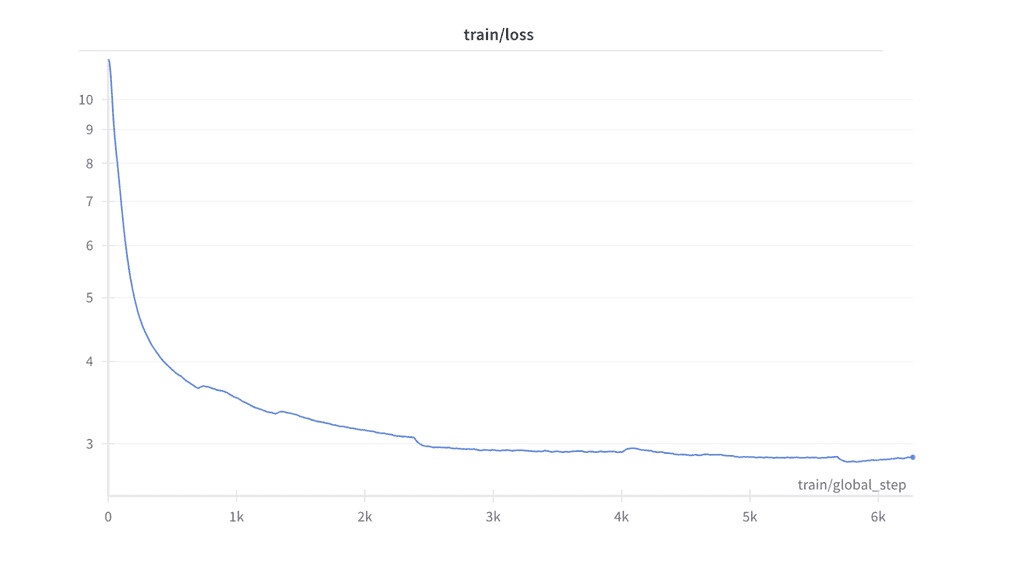
We chose bfloat16 as training precision due to stability issues with float16 precision.
License
The model inherits the license from meta-llama/Llama-2-7b.
Team
Sagar Sarkale, Prasad Mane, Shravani Chavan
- Downloads last month
- 4
