

Image-Text-to-Text
Transformers
Safetensors
GGUF
gemma3
turkish
türkiye
english
ai
lamapi
next
next-x1
efficient
text-generation
open-source
4b
huggingface
large-language-model
llm
causal
transformer
artificial-intelligence
machine-learning
ai-research
natural-language-processing
language
multilingual
multimodal
nlp
finetuned
lightweight
creative
summarization
question-answering
chat
generative-ai
optimized
unsloth
trl
sft
chemistry
code
biology
finance
legal
music
art
state-of-the-art
climate
medical
agent
text-generation-inference
Merge
dense
conversational

🚀 Next 4B (s330)
Türkiye’s First Vision-Language Model — Efficient, Multimodal, and Reasoning-Focused




📖 Overview
Next 4B is a 4-billion parameter multimodal Vision-Language Model (VLM) based on Gemma 3, fine-tuned to handle both text and images efficiently. It is Türkiye’s first open-source vision-language model, designed for:
- Understanding and generating text and image descriptions.
- Efficient reasoning and context-aware multimodal outputs.
- Turkish support with multilingual capabilities.
- Low-resource deployment using 8-bit quantization for consumer-grade GPUs.
This model is ideal for researchers, developers, and organizations who need a high-performance multimodal AI capable of visual understanding, reasoning, and creative generation.
Our Next 1B and Next 4B models are leading to all of the tiny models in benchmarks.
| Model | MMLU (5-shot) % | MMLU-Pro % | GSM8K % | MATH % |
|---|---|---|---|---|
| Next 4B preview | 84.6 | 66.9 | 82.7 | 70.5 |
| Next 1B | 87.3 | 69.2 | 90.5 | 70.1 |
| Qwen 3 0.6B | 52.81 | 37.6 | 60.7 | 20.5 |
| Llama 3.2 1B | 49.3 | 44.4 | 11.9 | 30.6 |
Also, our Next 14b model is leading to state-of-the-art models in some of the Benchmarks.
| Model | MMLU (5-shot) % | MMLU-Pro % | GSM8K % | MATH % |
|---|---|---|---|---|
| Next 14B (Thinking) | 94.6 | 93.2 | 98.8 | 92.7 |
| Next 12B | 92.7 | 84.4 | 95.3 | 87.2 |
| GPT-5 | 92.5 | 87.0 | 98.4 | 96.0 |
| Claude Opus 4.1 (Thinking) | ~92.0 | 87.8 | 84.7 | 95.4 |
🚀 Installation & Usage
Use with vision:
from transformers import AutoTokenizer, AutoModelForCausalLM, AutoProcessor
from PIL import Image
import torch

model_id = "Lamapi/next-4b"

model = AutoModelForCausalLM.from_pretrained(model_id)
processor = AutoProcessor.from_pretrained(model_id) # For vision.
tokenizer = AutoTokenizer.from_pretrained(model_id)

# Read image
image = Image.open("image.jpg")

# Create a message in chat format
messages = [
  {"role": "system","content": [{"type": "text", "text": "You are Next-X1, a smart and concise AI assistant trained by Lamapi. Always respond in the user's language. Proudly made in Turkey."}]},

  {
      "role": "user","content": [{"type": "image", "image": image},
      {"type": "text", "text": "Who is in this image?"}
    ]
  }
]

# Prepare input with Tokenizer
prompt = tokenizer.apply_chat_template(messages, tokenize=False, add_generation_prompt=True)
inputs = processor(text=prompt, images=[image], return_tensors="pt")

# Output from the model
output = model.generate(**inputs, max_new_tokens=50)
print(tokenizer.decode(output[0], skip_special_tokens=True))
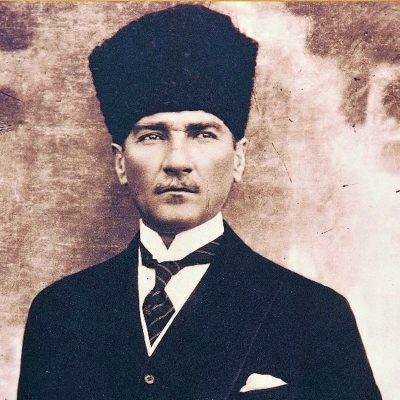
Who is in this image?
The image shows Mustafa Kemal Atatürk, the founder and first President of the Republic of Turkey.
Use without vision:
from transformers import AutoTokenizer, AutoModelForCausalLM
import torch

model_id = "Lamapi/next-4b"
tokenizer = AutoTokenizer.from_pretrained(model_id)
model = AutoModelForCausalLM.from_pretrained(model_id)

# Chat message
messages = [
    {"role": "system", "content": "You are Next-X1, a smart and concise AI assistant trained by Lamapi. Always respond in the user's language. Proudly made in Turkey."},
    {"role": "user", "content": "Hello, how are you?"}
]

# Prepare input with Tokenizer
prompt = tokenizer.apply_chat_template(messages, tokenize=False, add_generation_prompt=True)
inputs = tokenizer(prompt, return_tensors="pt")

# Output from the model
output = model.generate(**inputs, max_new_tokens=50)
print(tokenizer.decode(output[0], skip_special_tokens=True))
Hello, how are you?
I'm fine, thank you. How are you?
🎯 Goals
- Multimodal Intelligence: Understand and reason over images and text.
- Efficiency: Run on modest GPUs using 8-bit quantization.
- Accessibility: Open-source availability for research and applications.
- Cultural Relevance: Optimized for Turkish language and context while remaining multilingual.
✨ Key Features
| Feature | Description |
|---|---|
| 🔋 Efficient Architecture | Optimized for low VRAM; supports 8-bit quantization for consumer GPUs. |
| 🖼️ Vision-Language Capable | Understands images, captions them, and performs visual reasoning tasks. |
| 🇹🇷 Multilingual & Turkish-Ready | Handles complex Turkish text with high accuracy. |
| 🧠 Advanced Reasoning | Supports logical and analytical reasoning for both text and images. |
| 📊 Consistent & Reliable Outputs | Reproducible responses across multiple runs. |
| 🌍 Open Source | Transparent, community-driven, and research-friendly. |
📐 Model Specifications
| Specification | Details |
|---|---|
| Base Model | Gemma 3 |
| Parameter Count | 4 Billion |
| Architecture | Transformer, causal LLM + Vision Encoder |
| Fine-Tuning Method | Instruction & multimodal fine-tuning (SFT) on Turkish and multilingual datasets |
| Optimizations | Q8_0, F16, F32 quantizations for low VRAM and high VRAM usage |
| Modalities | Text & Image |
| Use Cases | Image captioning, multimodal QA, text generation, reasoning, creative storytelling |
📄 License
This project is licensed under the MIT License — free to use, modify, and distribute. Attribution is appreciated.
📞 Contact & Support
- 📧 Email: lamapicontact@gmail.com
- 🤗 HuggingFace: Lamapi
Next 4B — Türkiye’s first vision-language AI, combining multimodal understanding, reasoning, and efficiency.

- Downloads last month
- 157